Warm Weather
LKW ELEWeather
3.3436.00 Reviews
- Version
- 1.2.3
- Installs
- 5.00M
- Age Rating
- Everyone
Screenshots
Our Review of Warm Weather
 Analysis by Appyee
I tend to judge a weather app by a small, ordinary question: can I make a better decision before I leave home, without spending several minutes tapping around? Warm Weather aims to make that check feel approachable, with a focus on everyday conditions rather than a technical dashboard. I find that appealing for quick planning, though a polished screen is only useful if the information fits the decision I need to make.
Where a quick check can get confusing
Weather apps can feel straightforward until a forecast seems to contradict what is outside. A displayed temperature, a “feels like” figure, and changing conditions answer different questions, so I try not to treat any one of them as a guarantee. For a short walk, the current conditions may be enough; for a long trip, I would also look at how the forecast changes over time.
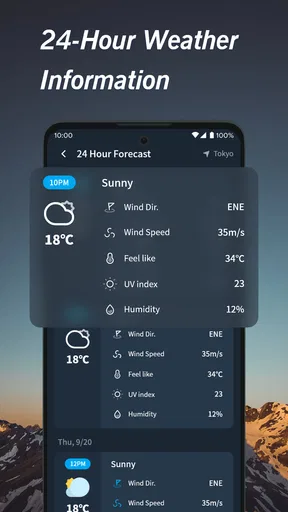
That distinction matters with Warm Weather’s hourly forecast and radar map. I would use the hourly view to compare the timing of a planned outing, then consult the map if nearby weather could affect the route. Neither view removes uncertainty, and radar is most useful as context rather than a promise about exactly what will happen at my door.
Checks that make the first use smoother
When I try a weather app in a new place, I first check that it is showing the location I actually care about. If a forecast looks irrelevant, confirming the selected location is a more useful first step than repeatedly refreshing the screen. I also compare the conditions shown in the app with the sky outside before relying on them for a time-sensitive plan.
Notifications are worth setting up with a light touch. I would choose only the weather changes that could alter my day, rather than turning on every alert and eventually ignoring them. A widget can make routine checks faster, but I would still open the app when I need to inspect the hourly forecast or map instead of assuming a compact glance contains the whole story.
How I would use it in a real day
Imagine I have errands in the afternoon and a walk planned afterward. I can check the hourly view before choosing when to leave, then look at the radar map if conditions nearby seem unsettled. If I have enabled a relevant notification, it may provide another prompt to reassess. The practical benefit is not certainty; it is having a few different ways to decide whether to bring an extra layer, change the timing, or check again before setting off.
This kind of routine is where Warm Weather makes the most sense to me: ordinary local planning, quick checks, and a home-screen glance when I am busy. Someone who wants to study detailed atmospheric information or make decisions where precise, specialist forecasting is essential may be better served by a dedicated source. I would also keep a second trusted forecast in mind for a consequential trip rather than letting any single app settle the question.
First Impressions
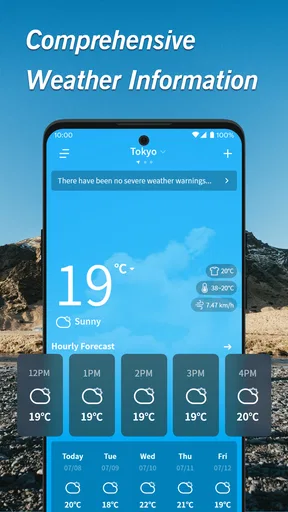
Right from the get-go, Warm Weather stands out with its sleek interface. I’m talking smooth animations, vibrant colors, and a layout that just makes sense. As soon as you open the app, you’re greeted with a beautifully designed home screen that gives you the current temperature, weather conditions, and even the "feels like" temperature. It’s like having a weather-savvy friend in your pocket.
Features That Shine
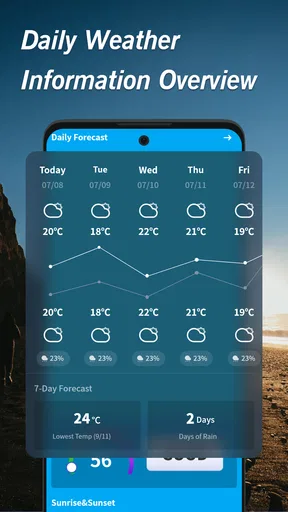
Now, let’s dive into some of the features that got me hooked. First off, the hourly forecast is a game-changer. You get updates every hour, so you can plan your day down to the minute. Whether you’re deciding if you need that extra layer before heading out or planning a picnic, this feature has got your back.
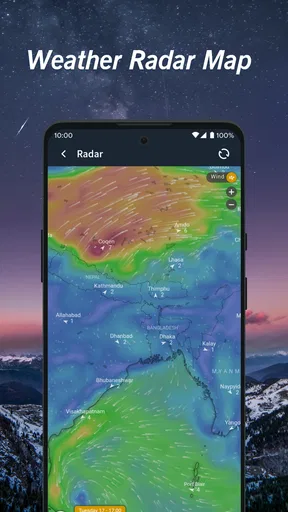
One of my favorite features is the radar map. It’s super interactive, allowing you to zoom in and out, and it shows real-time updates of weather patterns. If you’re like me and love to play meteorologist, you’ll appreciate this feature.
Reading the forecast without over-relying on it
I would treat the hourly forecast as a way to compare likely timing, not as a minute-by-minute promise. For example, if a picnic is flexible, checking whether conditions look better earlier or later can help me choose a window. If the plan depends on a narrow timing window, I would check again closer to departure and make room for conditions to shift.
The radar map serves a different purpose. I find it more useful for seeing the broader pattern around an area than for deciding what will happen at one exact address. When I am walking a familiar route, I can use that wider view to decide whether to take a shorter path or postpone. For unfamiliar travel, I would not use a map view alone as a substitute for route-specific planning.
Notifications, widgets, and useful restraint
But wait, there’s more! The app offers custom notifications for weather conditions that matter to you. Hate getting caught in the rain without an umbrella? Set an alert! It’s those little touches that make Warm Weather feel like it was designed just for you.
And let’s not forget the widget options. I added one to my home screen, and it’s a lifesaver. A quick glance tells me everything I need to know before I even unlock my phone. Plus, it looks pretty snazzy among my other apps.
My practical tip is to let the widget handle routine awareness and save opening the app for a decision that needs more context. If the display seems out of date or an alert does not arrive, I would check the phone’s connection and the app’s notification settings before assuming the forecast itself is wrong. I would also avoid enabling so many alerts that the genuinely useful one gets lost in the noise.
When the app may not be the problem
A weather screen can only help if the phone can load current information. If the map or forecast does not appear as expected, I would first check whether other apps can connect, then reopen Warm Weather and give it another try. If the issue is limited to alerts, checking that notifications are allowed for the app is a sensible basic troubleshooting step. Those checks are general phone habits, not a promise that every interruption has the same cause.
Location is another practical point. If the conditions do not match the place where I am, I would verify that the app is displaying the intended location rather than repeatedly changing settings at random. For a day spent between home, work, and an outdoor destination, I would check the relevant place before leaving and revisit the forecast when plans change. That simple habit is more dependable than treating a single glance as a forecast for every stop.
Warm Weather is a free weather app from LKW ELE, rated for Everyone and available for devices running Android 6.0 or later. Its current version is 1.1.8. It has an average rating of 4.1 from around 5,600 ratings, with over a million installs and 307 written reviews. It was released on December 19, 2024. Those figures suggest that people are trying it, but I would still judge it by whether its everyday views work for my own routine.
Who will get the most from it
I think Warm Weather is best suited to someone who wants an easy visual check, an hourly view for arranging ordinary plans, and a widget or alert to reduce the need to open the app repeatedly. If I mainly need to decide whether to carry a jacket, adjust a walk, or pick a better time for an errand, those tools make a sensible combination. The app’s free availability also makes it easy to try without turning the decision into a purchase.
It is less compelling for someone who prefers a plain list of forecast figures, wants specialist detail, or needs a tool built around complex travel or professional planning. A simple forecast page may be quicker for a person who only checks today’s conditions, while a more specialized weather service may suit someone who needs deeper analysis. I would choose based on the question I need answered, not on how lively the interface looks.
The Verdict
After using Warm Weather for a couple of weeks, I can confidently say it’s a must-have for anyone who likes to stay ahead of the weather. It’s user-friendly, packed with useful features, and just downright fun to use. Whether you're a weather enthusiast or just someone who hates getting caught off guard, this app is worth checking out.
So, if you’re ready to upgrade your weather game, give Warm Weather a try. Trust me, you won’t look at weather apps the same way again!
Verdict
Strengths of Warm Weather
- Intuitive user interface for easy navigation.
- Customizable alerts for severe weather updates.
- Detailed hourly forecasts available.
- Radar maps are dynamic and informative.
- Minimal data usage, ideal for limited plans.
Limitations of Warm Weather
- Ads can be intrusive during use.
- Limited offline functionality.
- Occasional lag in radar updates.
- Doesn't support all languages.
- Some features require premium access.
Similar Picks in This Category
View All
Weather - By Xiaomi
Xiaomi Inc.4.1

Weather & Radar Forecast
WetterOnline4.8

Weather
OneLouder Apps4.6

AccuWeather: Weather Radar
AccuWeather3.6

The Weather Channel - Radar
The Weather Channel4.6

1Weather Forecasts & Radar
OneLouder Apps4.3
Frequently Asked Questions
What is Warm Weather and how does it work?
Warm Weather is a weather forecasting app designed to provide accurate and up-to-date weather information. It uses data from multiple reliable sources to deliver forecasts, current conditions, and alerts. The app features an intuitive interface that allows users to easily access weather maps, hourly updates, and long-term forecasts tailored to their location.
Is Warm Weather available for both Android and iOS devices?
Yes, Warm Weather is available for both Android and iOS platforms. Users can download the app from the Google Play Store for Android devices and the Apple App Store for iOS devices. The app is optimized to run smoothly on a wide range of smartphones and tablets, ensuring a seamless user experience.
Does Warm Weather offer real-time weather alerts?
Warm Weather provides real-time weather alerts to keep users informed of significant changes in weather conditions. These alerts include severe weather warnings, such as thunderstorms, heavy rain, or extreme temperatures. Users can customize the alert settings to receive notifications based on their preferences and geographic location.
Can I use Warm Weather offline?
Warm Weather requires an internet connection to provide the most accurate and current weather data. However, once the app has downloaded the latest information, users can access previously viewed forecasts and maps offline. For the best experience and up-to-date information, an active internet connection is recommended.
Does Warm Weather offer any customization options for the user interface?
Yes, Warm Weather allows users to customize the app's interface to suit their preferences. Users can choose different themes, set their preferred units of measurement (Celsius or Fahrenheit), and select specific locations for quick access to weather data. This personalization ensures a user-friendly experience tailored to individual needs.
